


Nothing OS 3.1 update: Features, improvements, and performance boost
Nothing OS 3.1: The company has released a new update for both these phones, the Nothing Phone 3a and the Nothing Phone 3a Pro. If you want to check for an update, then you have to check manually by going to settings, then scrolling down a bit, tapping on system, tapping on system update, and tapping on check for update. In this you will see camera enhancements and some other improvements. A note has been given in the update that it is like this: “During the upgrade, the system will optimize in the background to enhance your user experience. The device may experience temporary overheating and increased power consumption but will quickly return to normal after the upgrade is complete”. So there is no need to feel any tension.

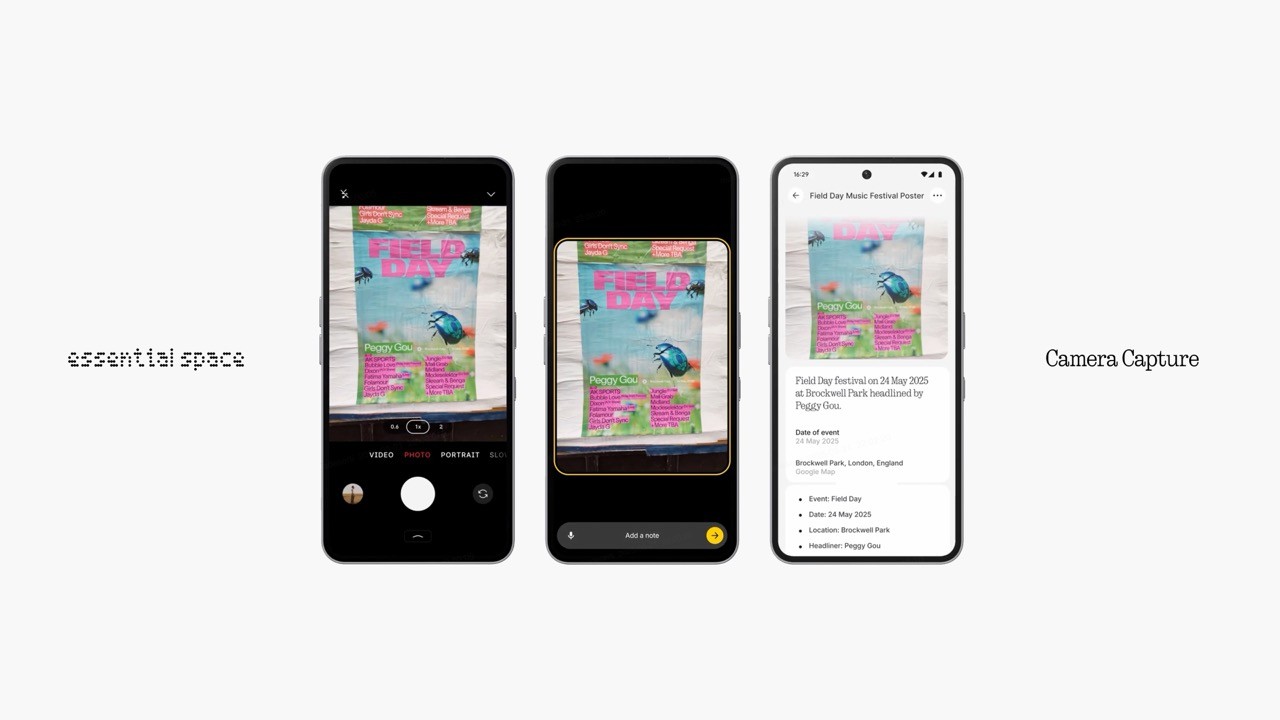
You are getting to see an update size of 96.60 MB on your phone. Nothing has rolled out the Nothing phone 3a and Nothing phone 3a Pro globally on 24 March. The biggest highlight of the update is that it makes the Essential Key on both phones work within their native camera apps. The update also brings some camera enhancements. Both the devices are running nothing OS 3.1 based on android 15. The Both device version is also the same 3.1, and the last number is 2319. Nothing added new essential key on nothing phone 3 series.
Camera enhancements
Everything new in Nothing OS 3.1 for Nothing Phone users. Preview whenever the camera is openit used to take the entire screenshot including the shooting modes gallery preview and the things present on the screen but press essential key now captures the preview not the entire screen and can add a note, text or voice. “How Nothing OS 3.1 enhances Nothing Phone performance and UI” You will have a summary of it you can see based on the photo we captured. It will also auto-transcribe the audio if you use the audio features, so this is the only new add-on that they have done with the essential key, or you can say essential space. If you see the other changes that are layered to the camera, all the changes are the same of 99%; only one change was different on the pro model which is improved focusing accuracy 2x focal length. You notice the clear difference in your phone.
The focus is more precise, and the edges are also quite sharp, even at 2x focal length. The other change is a more intuitive camera zoom interaction. We didn’t notice any kind of major difference, there was no difference while interacting with the zoom levels. They always have the issue in the camera UI, which is still not perfect even on the nothing 3a series. You get to see a slight lagging when you use different zoom options. They also mention correcting the reddish skin tone issue in front-facing camera selfies and enhancing the white balance in rear cameras.
They also mention faster overall camera performance and responsiveness, which are slightly improved. But the camera performance it still takes around 3-4 sec to process the image, the camera performance is not up to rank on nothing phone 3a series. The image quality has a lot of improvements done after this latest update. And about reddish skin tone its prove and some times details were also not sharp enough especially when clicking in tricky lighting like indoor or backlit scenes, after the update the problem seems to be mostly solved the skin tones now looks natural details like hair and facial texture are much clear and overall the camera is handling lights and shadows better, colours looks balance and realistic and our photos looks more attractive, the camera quality has been much better on both devices after the update.
They have improved the always-on-display transition animation. We did not see much of a difference, but smoothness seems to be slightly improved on the latest build when it comes to always-on-display transition animation. The other mention is various bug fixes and stability improvements. So there were the changes that you see on the new nothing phone 3a and 3a pro.
What do we not like?
The key accidentally many times it happened that i take out phone from the pocket and instead of pressing the power key so thumb directly goes on the essential key which triggers essential space a lot of time so the placement is quite weird. Second is nothing had no option to autosync.
